We Moved concealed.com From Framer to Astro: 11 Days, 45 URLs and the Numbers
How we moved our own site from Framer to Astro in 11 days without changing a URL, what Lighthouse measured before and after, and why we still build client sites in Framer.
- Framer
- Web Development
- Performance
- Case Study

We moved concealed.com from Framer to Astro, a framework that builds each page into plain HTML ahead of time, in 11 days. Work started on 23 October 2026 and the domain switched on 3 November. All 45 URLs in Framer's last sitemap still answer at the same address, so no redirect was needed. On Lighthouse's mobile test the home page went from 70 to 95, and it now downloads 568 KB instead of 2,061 KB.
We still build our clients' marketing sites in Framer. This post covers why our own site is different, how the move went, and what got harder.
Why Our Own Site Left Framer
Framer is built for a marketing team that changes its own pages by hand, layout included. That is why we recommend it to clients, as we wrote in why we narrowed down to Framer sites. Our own site had stopped being that kind of project, for four reasons.
The site had become a product. In the two weeks after the switch, the sitemap went from 45 URLs to 128. We added a Portuguese version of every page under /pt, five interactive resources such as cost calculators and an MVP scope template, and structured data built from what each page shows. Most of that is code, and code is easier to write, review and test as files in git than as components on a canvas.
AI agents edit it. Our team makes most changes to the site by asking an AI coding agent, which edits the files, runs the checks and opens a pull request that a person reviews. An agent can work on a repository the way a developer does. It can't do the same inside a design canvas.
Framer's pages were heavy, and we couldn't trim them. Every Framer page loads Framer's own runtime, and the home page's HTML alone was 1.3 MB before compression. On Framer we had no way to remove what a page didn't use. The numbers below show what changed.
We own it, and it costs less. Framer cost us 360 € a year for the site. The new site runs on the Vercel plan we already pay for, the images sit on Cloudflare R2's free tier, and the editor our team uses is self-hosted at no cost. Because the site is code in our own repository, we can move it to another host, such as Cloudflare Pages, whenever we need to.
How the Move Went
We treated the live Framer site as the source of truth and checked the new site against it, page by page.
First we captured it. A script crawled every page in the sitemap and saved its HTML, styles, images and videos, plus the answers inside accordions that only appear after a click. That copy is also our backup of the Framer site.
Then we generated the content from it. 46 small extractors, one per kind of section, read the saved HTML and wrote each page to a content file. The new site has one component per visual pattern, so sections that Framer had built twice for different content became one.
Then we compared. A visual diff screenshotted every page on the old and new site at 1440, 1000 and 390 pixels wide, and we fixed the differences until the two matched.
Last, we switched. We pointed the domain at the new site on 3 November and kept the old records written down, so going back would have meant changing three DNS entries. A check then requested every URL from Framer's last sitemap on the new site, and each one answered.
Keeping every URL is what protects rankings in a move like this. We didn't change a single address, so the redirect list is still empty, and the old .pt domain and the www address each reach the new pages in one permanent redirect.
The Numbers, Before and After
We ran Lighthouse on four pages, one of each kind, on 15 November 2026. The Framer side is the HTML that was live on concealed.com before the switch, which still loads its scripts, fonts and images from Framer's servers; it is byte for byte the page Framer still serves on its own staging address. The Astro side is the live site. Each figure is the middle of three runs, with analytics and cookie scripts blocked on both so they don't skew the result.
| Page | Mobile score | Desktop score | Mobile LCP | Page weight | JavaScript |
|---|---|---|---|---|---|
| Home | 70 -> 95 | 92 -> 100 | 7.6 s -> 2.8 s | 2,061 KB -> 568 KB | 612 KB in 49 files -> 6 KB in 7 |
| Framer websites service | 65 -> 96 | 92 -> 100 | 8.9 s -> 2.7 s | 3,274 KB -> 456 KB | 1,994 KB in 125 files -> 6 KB in 7 |
| Grafibeira case study | 74 -> 92 | 88 -> 100 | 12.4 s -> 3.4 s | 2,079 KB -> 530 KB | 592 KB in 48 files -> 5 KB in 7 |
| Pricing blog post | 82 -> 96 | 99 -> 100 | 4.7 s -> 2.8 s | 793 KB -> 254 KB | 442 KB in 38 files -> 6 KB in 7 |
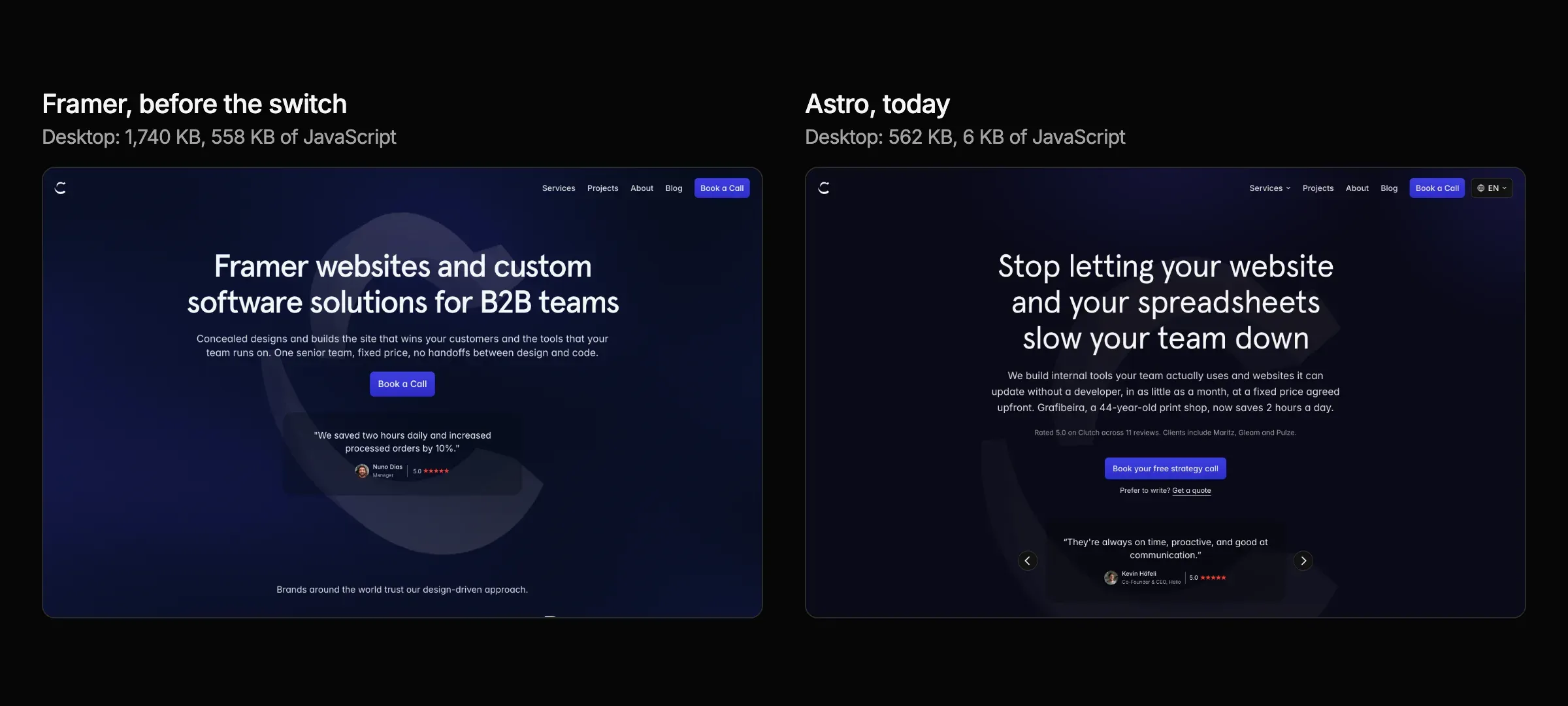
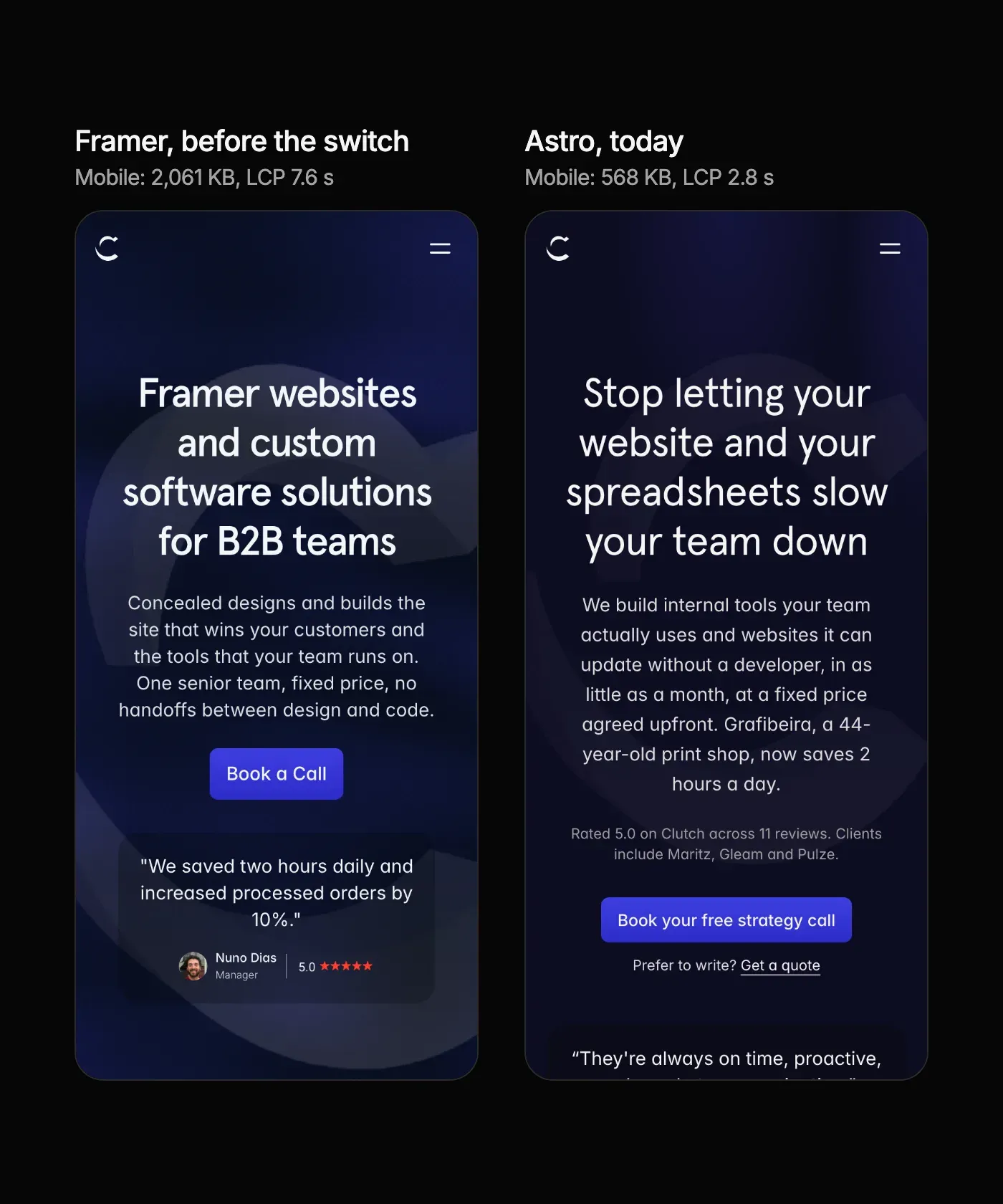
The home page has a new headline and layout since the switch: once the site was code, we reworked the home page, the service pages and the funnel pages within days.
LCP (largest contentful paint) is how long the biggest thing on the screen takes to appear, on Lighthouse's simulated mid-range phone. Page weight is everything the browser downloads, compressed.
Most of the difference is JavaScript. Every Framer page loads Framer's runtime and the code for each component on it, even when the page only shows text and images. The Astro pages send a few kilobytes of script for the menu, the forms and the sliders, and nothing else. Each page is now a third to a seventh of its old weight, and the biggest element on a phone appears 2 to 9 seconds sooner. Desktop scores were already good on Framer, so the change there is smaller.
Two caveats. During the test the old HTML was served from our own machine, which flatters Framer slightly, since that one file arrived without a trip across the network. And Lighthouse is a lab test on a simulated phone and connection, not a measure of real visitors.
What Got Harder
Our designers and our marketing team lost the visual editor. In Framer, anyone with access could change a page by dragging it into shape and publish it. Now text, posts and case studies can still be edited in TinaCMS, an editor that saves to the same files in git, but any change to a layout or a new kind of section is code. So everyone on the team, designers included, now ships changes through an AI coding agent. That works for us because we build software every day. A marketing team without that habit would feel the loss at once.
Previews are slower. Framer publishes a change in seconds. Here a change goes through a build and a preview deployment first, which takes minutes.
Should You Make the Same Move?
Both setups are good at different things, and the choice depends on who changes the site.
| Framer | Code (Astro) | |
|---|---|---|
| Who changes the site | Anyone on the team, visually | Developers, or a team working with AI coding agents |
| A new layout | Drag it into shape and publish | A code change, reviewed before it goes live |
| Publishing a change | Seconds | Minutes, through a build and a preview |
| Page weight | Framer's runtime on every page | Only the code each page needs |
| Several languages, tools, pages from data | Possible, within Framer's limits | As far as the code goes |
| Running cost | A Framer plan per site | Hosting, often within a plan you already pay for |
| Moving later | Rebuild the site elsewhere | Move the files to another host |
Stay on Framer if your marketing team changes pages itself, layout included, and nobody on the team writes code or works with coding agents. That is the situation we build client sites for, and Framer handles it better than anything we've used.
Moving into code makes sense when the site has become more of a product than a set of pages: several languages, calculators or tools with their own logic, many pages built from the same data, or a team that already ships with developers or AI coding agents every day. Then the canvas stops saving time and starts adding steps.
We can do the same move for your site, with the same method: every URL kept, every page checked against the live site before the switch. If you're weighing it, book a call and we'll tell you honestly whether it's worth it.
Frequently Asked Questions
How long does a move from Framer to Astro take?
Ours took 11 days from the first commit to the domain switch, for a site of 45 pages with 20 case studies and 9 blog posts. A site with less custom design, or fewer pages, takes less.
Do you lose rankings when you leave Framer?
You lose rankings when URLs change without redirects or when content goes missing. We kept every URL and every piece of content, and checked each page against the live site before switching.
Can you still edit an Astro site without a developer?
Text, images, posts and case studies, yes, with an editor such as TinaCMS. New layouts and new kinds of section need a developer or an AI coding agent.
What does an Astro site cost to run compared with Framer?
Framer cost us 360 € a year for concealed.com. The Astro site runs on a Vercel plan we already had, with images on Cloudflare R2's free tier and a self-hosted editor, so it added nothing to our bills.
Does Concealed still build websites in Framer?
Yes. Framer is still what we use for most client marketing sites, because the client's team can change the site on its own after launch. See our Framer websites service.
Can Concealed move our site from Framer to code?
Yes, with the method in this post. Book a call and we'll look at your site first.